What is Pegasus by Innovate?
The Pegasus Sample Access Platform is Innovate’s Do-It-Yourself sampling tool that was launched in 2018 by InnovateMR. Using Pegasus, you can easily specify, price and populate your research study with qualified survey respondents from Innovate’s proprietary panel PointClub. This second-generation platform provides real-time access to high quality, richly profiled respondents who match your exacting criteria.
What is the cost to use Pegasus?
There are zero platform fees to use Pegasus! Simply login and pay for only the completed survey responses.
How do I create an account in Pegasus?
Go to Innovate website and click login. At the bottom right hand side you can click on Sign-up for an account. Simply follow the prompts to add your Name, Company Email and a password to gain instant access.
How do I know my registration was successful?
Once registered successfully, you will receive an automated email from Pegasus with your login credentials. Once logged in, you can change your password from the Access tab any-time.
How do I add more team members to my Pegasus account?
You are in control. Log into your Pegasus account and click on the Access tab down the left-hand side. Click add new member. Add the details of the new member and give them appropriate access. Once added, the new member will receive an automated email with their login credentials.
What countries are currently available in Pegasus?
Pegasus currently supports projects in the US, UK, India, Canada, Italy, France and Germany. You currently can view feasibility plus pricing for US, UK and Canada. India, Italy, France and Germany are available in Pegasus and you will see pricing, but feasibility is not available at this time. For any additional countries, please contact your sales representative. The countries not listed in Pegasus can swiftly be serviced through our dedicated managed service teams that are available for 24/7/365 as Innovate has sample in over 45+ countries.
Can I copy the target from a previous project to a new or existing project?
Yes, you can either copy the entire project or create a new project and import the desired group. To import, simply type the group name/number or keywords and the targets can be copied over on the targeting tab. Any existing targets or quotas will be replaced with the copied one.
Can I copy a group in an existing study?
Yes, you can copy the entire group including targets, quotas, project fielding metrics, and survey URL to a new group. You only need to reset your Max CPI. If the survey URL is the same as a previously tested group, you can launch your new group immediately without retesting.
Can I setup quotas on starts instead of completes?
Yes, Pegasus allows to set quotas based on starts. You can access this feature when you setup a new quota.

Can I set up nested quotas in Pegasus?
Yes, we allow up to 3 nested targets at once. You can setup as many quotas as desired.
Can I set a soft quota in Pegasus for tracking purposes?
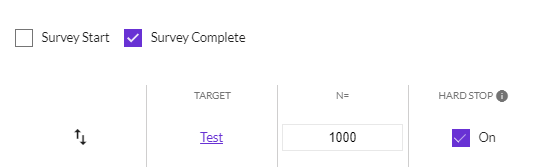
Yes, Pegasus allows you to set soft quotas by unchecking the Hard Stop box in the Quotas tab.
How can I setup Census Representative quotas in Pegasus?
Go to the targeting tab and select More Options. Select census representation and choose the attributes you are interested in. Pegasus will then setup the target and quotas automatically for you. Once selected, any existing quotas or targets will be overridden.

How can I download my IDs?
At both the project and group level there is a settings tab you can roll over. Within there you will see a download button where you can select the respondent status’s you would like. Once selected, automated file will be downloaded for you.
On Job level:

On Group level:

Can I modify my targets in Pegasus after my project is live?
Yes, you can modify your target in Pegasus at any time. To modify, click on the Sampling tab, and then click the hyperlink text for the target name and modify the target as desired. Or remove the target completely by using the trash can icon.
How do I setup my Survey URL in InnovateMR Platform?
InnovateMR Platform uses the token variable “tk” for variable pass-back. You will always need to add [%%token%%] in the survey URL to enable Pegasus to pass the unique value for each respondent. Example: http://www.survey.com?tk=[%%token%%]
Pegasus uses "mid" for Panelist ID pass-back. You can add mid=[%%mid%%] in the survey URL to enable Pegasus to pass the Panelist ID in addition to the token variable "tk". Example:
http://www.survey.com?tk=[%%token%%]&mid=[%%mid%%]
Can I pass any real-time data through the URL?
Yes, Pegasus can pass Age, Gender, Region, Income, Zip-code, Ethnicity, Race and Education of the panelists real-time in your survey URL. To pass this data, you just need to add variables to capture it. For example, to pass Age add “age=[%%AGE%%]”, and others as below, to your survey URL in Pegasus.
- age=[%%AGE%%]
- gender=[%%GENDER%%]
- zip=[%%ZIPCODES%%]
- region=[%%REGION%%]
- ethnicity=[%%ETHNICITY%%]
- race=[%%RACE%%]
- education=[%%EDUCATION%%]
- income=[%%INCOME%%]
To enable data pass-over in your survey URL of the panelists, the demo targets you want the data pass-over for, should be added in Pegasus always before the survey goes live.
Example URL: http://www.survey.com?tk=[%%token%%]&age=[%%AGE%%]&gender=[%%GENDER%%]®ion=[%%REGION%%]
Which programming platforms is Pegasus compatible with? Any restrictions?
Pegasus has full compatibility with all existing survey designing tools (SurveyMonkey, SurveyGizmo, Qualtrics, ConfirmIT to name a few). There is no restriction. If you have any issues or confusion, please reach out to us at: support@pegasusmr.com
Can I include my own sample partners within Pegasus?
Yes. First add your sample partner on Suppliers tab from your home screen. Then once you are in your project, Click Sampling – Supply Partners to add your own partner. Once added you will get the Partner Live & Test URL’s to share with them to enable testing. their redirects should be updated in Pegasus before testing and live sample deployment. Their fielding metrics will be visible on Group Stats tab also.
Update your Supplier details as required.
Update your supplier Qualified and Terminate redirects in the space below.

How do I confirm the valid complete IDs at the conclusion of my project?
Go to the Confirm Completes tab within any group of your project, select the group(s) and if all completes are accepted, simply press the confirm completes button and all completes will be considered valid. If there are some completes you need to remove, you can upload all the accepted completes in Pegasus in a .csv format file with just token values. Once uploaded, Pegasus will invalidated the IDs not included. To see your valid counts, go to the job navigation rollover and choose verified stats.

Can I re-open a closed project in Pegasus?
No, you cannot re-open a closed project in Pegasus. However, you can copy it and run the same project again. Everything except Max CPI gets copied over from your original project.
What is Max CPI?
Max CPI ensures you never go over your budget. Setting Max CPI ensures that survey respondent traffic will pause when this amount is reached and you will receive an email alert asking whether you want to raise your Max CPI and resume traffic. The Max CPI can be updated on the Sampling tab.

What is your IR calculation?
Completes / (Completes + Post-Pegasus terms + Post-Pegasus Overquotas)
Does your LOI exclude outliers?
Yes, Pegasus uses trimmed Average LOI for pricing calculations, although Pegasus also displays median LOI. Pegasus trims the lowest & highest outliers (+/- 3%) when calculating Average LOI. You can check LOI stats in the Group Stats tab -> Cost Overview.

Can I do a recontact in Pegasus?
Yes, we are currently building this feature into Pegasus. In the meantime, our support team can help you run a recontact. Please email support@pegasusmr.com for guidance.
What is Pegasus Perks?
Pegasus Perks™ allows you to earn an instant rebate for buying audience sample via Pegasus. As you use Pegasus to buy audience sample, the amount spent accrues monthly, giving you the opportunity to achieve Perks reward tiers. Each new tier increases the percentage of instant rebates received in Pegasus. At the end of every month, the company automatically reduces your monthly invoice using Perks earned in prior months for the calendar year.


Why do I get emails from Pegasus for paused projects?
At Innovate, we value our quality panellists and need to reward them with their incentives in a timely manner. On the 16th of each month, we will reconcile projects from the previous month. For example, if a project was run in December, then on the 16th of January, Pegasus will compile the completes that show in Pegasus and validate each complete. Prior to this reconciliation, three reminder emails go to all Pegasus users for Paused and Live projects to confirm the completes achieved.