Innovate's top market research tool, InnovateMR Platform, just got more powerful! We now have a quick and easy way for you to create your own custom screening questions in our DIY Sampling Platform, on the fly. Customize your research, tailor your needs, and get faster answers all with Innovate's self serve sampling tool.
CREATE CUSTOM SCREENING QUESTIONS
We know sometimes you have narrow targets that require additional screening that might not be in our question library. Now you can create your own screening questions within your account. Once you create a question, it will continue to be available to all the users in your account at any time!
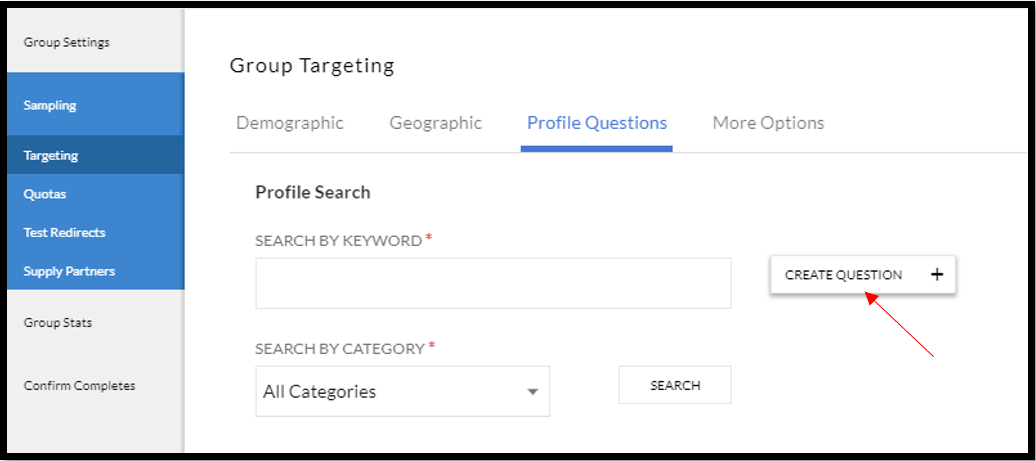
On the Profile Questions tab, there is now a button to CREATE QUESTION.
Once you click on create question, you can start to create your single or multi select question right in InnovateMR Platform. Make quick and easy selections to randomize, alphabetize or customize the order of your answer choices. Have a lot of answer options? Use the 'bulk upload answers' to quickly copy/paste!

Once you have added your question, and hit save you can easily select the valid answer choices and save to your group.

USE PREVIOUSLY CREATED CUSTOM QUESTIONS
Now that you have created your custom question, you, or anyone else in your company, can use it in any group. Under the targeting tab, select Profile Questions. You can search by keyword for your specific question or search by category 'My Custom Question.' My Custom Question category will store all of your company's custom profiling questions.
